
The AI Migration That Documented Itself
Moving a Docker Home Server from MacBook to Mac Studio

The best documentation I ever wrote was the documentation I was forced to write when I moved everything to a new machine.
In Part 1, I showed how I turned a MacBook Pro into a 24/7 Docker server: 13 containers, a 3-layer sleep prevention stack, 40+ LaunchAgents. It worked for four months. Then the Mac Studio arrived.
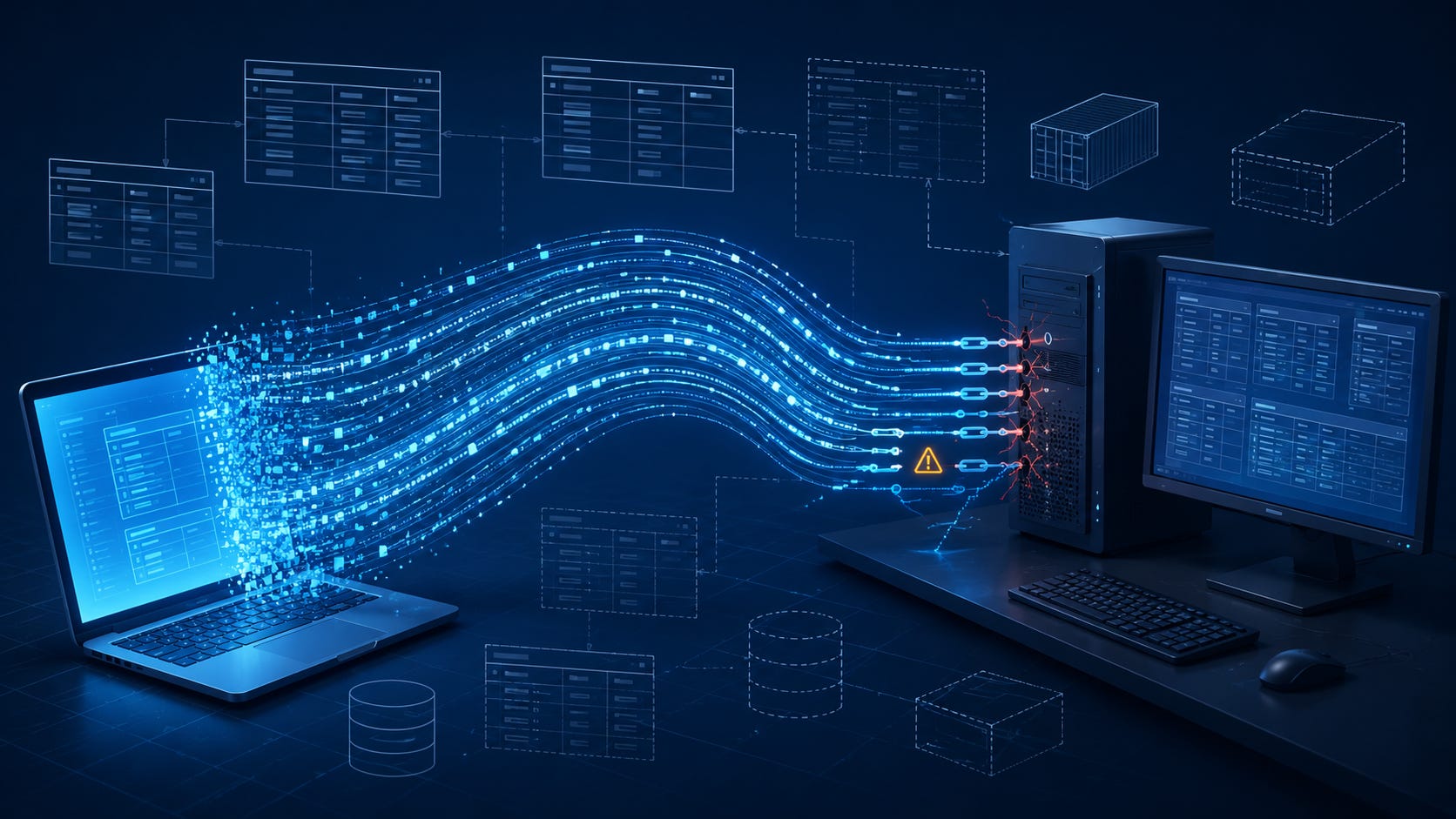
M2 Ultra. 192GB RAM. No lid to close. No thermal throttling. No need for Amphetamine, pmset, caffeinate, or any of the MacBook sleep-prevention machinery I spent weeks debugging. A desktop is a server by default. The infrastructure I built to compensate for the MacBook’s laptop-ness became obsolete the moment I unboxed the Studio.
The migration should have been straightforward: export data, set up the new machine, restore, verify. And it mostly was. I wrote a two-script migration system (one to export, one to set up). The scripts covered 80% of the migration without a hitch. It’s the other 20% that taught me something.
The 80% That Worked
Let me give credit where it’s due. The automation worked.
export-for-migration.sh correctly identified and packaged all the .env files, data volumes, and cross-project dependencies. setup-mac-studio.sh installed Homebrew, OrbStack, Docker CLI, Node, Python, Tailscale, and every other tool in a single run. The ~15GB rsync of ClickHouse and MinIO data transferred cleanly with no corruption. When I ran docker compose up -d on the Studio for the first time, core infrastructure came up healthy. Langfuse (six containers with interleaved health dependencies) started clean on the first try.
The checklist covered 80% of the migration. The remaining 20%, every single failure, was at an integration boundary.
Not in the containers themselves. Not in the data. At the seams: where Docker meets macOS, where a backup assumption meets a different source machine’s state, where a Unix convention meets an Apple runtime requirement. The integration boundaries are always where systems reveal what they actually are, not what you thought they were.
Three Failures That Tell the Story
1. The Invisible Database
After the ClickHouse container started healthy on the Mac Studio, I ran SHOW DATABASES to verify the migration. The family_office database wasn’t there. Not degraded, not erroring. Just absent. The container was green. The healthcheck was passing. The database simply did not exist.
I checked the metadata directory on disk. All 90+ table metadata files were present. The schema files were intact. The data files were in place. From a filesystem perspective, everything was there. From ClickHouse’s perspective, the database didn’t exist.
The culprit was a single file: family_office.sql.tmp. A stale temp file left over from an interrupted write operation on the source machine, probably a backup or schema modification that got killed mid-execution. When ClickHouse started on the Studio, it found the .tmp file alongside the main .sql file, flagged the database metadata as potentially corrupt, and silently skipped it during startup.
# 90+ table files exist, but ClickHouse can't see the database
docker exec local-clickhouse bash -c \
  'ls /var/lib/clickhouse/metadata/family_office.sql*'
# family_office.sql
# family_office.sql.tmp  <-- this is why

# Fix: remove the temp file, restart
docker exec local-clickhouse rm \
  /var/lib/clickhouse/metadata/family_office.sql.tmp
docker restart local-clickhouse
# family_office now visible, 1.2M rows verified
Three lines to fix. Two hours to diagnose.
Silent failures are the worst failures. Everything looked healthy. The container was green. ClickHouse was accepting queries. The database just wasn’t there, and nothing told me why. The lesson for migration verification: SHOW DATABASES and a row count check are not optional post-restore steps. They are the whole point.
2. The Symlink That Crashed Tailscale
Tailscale installed cleanly from the App Store. But tailscale wasn’t in PATH, because App Store builds live in the /Applications bundle, not /usr/local/bin. The obvious fix: symlink it.
sudo ln -sf \
  /Applications/Tailscale.app/Contents/MacOS/Tailscale \
  /usr/local/bin/tailscale
tailscale status worked. tailscale ip worked. I ran through the basic verification checks and moved on to configuring tailscale serve, the feature that proxies local HTTP services through Tailscale HTTPS with valid certificates.
It crashed immediately:
Fatal error: The current bundleIdentifier is unknown to the registry
macOS app binaries are not Unix binaries. When an App Store application runs, it introspects its own filesystem path to determine its bundle identity. That bundle identity gates access to entitlements, the system extension registry, and macOS-specific API surfaces. When you symlink the binary, the process sees its resolved path as /usr/local/bin/tailscale. The bundle lookup fails. For simple commands that don’t touch those macOS subsystems, it works fine. For tailscale serve (which requires a system extension and networking entitlements), it crashes.
The fix is a wrapper script that preserves the execution path:
#!/bin/bash
exec /Applications/Tailscale.app/Contents/MacOS/Tailscale "$@"
Drop that in /usr/local/bin/tailscale, make it executable, done. exec replaces the shell process with the binary, so the binary sees the correct invocation path.
This distinction (wrapper script with exec vs. symlink) is not obvious if you think of macOS apps as Unix binaries with a launcher skin. They’re not. They carry implicit context: bundle IDs, entitlements, framework paths, codesigning anchors. That context breaks the moment you move them outside their .app wrapper. The App Store version compounds this because the sandbox adds additional identity requirements on top of the standard bundle model.
Note: if you install Tailscale from the standalone .pkg download instead of the App Store, this issue doesn’t apply. The standalone version puts binaries in /usr/local/bin directly. But on a fresh macOS machine, App Store is the default path most people follow.
3. The .env That Was Silently Incomplete
The family office container (a multi-service stack with ClickHouse, Postgres, and a Next.js frontend) started in a restart loop after restore. First error: JWT_SECRET is undefined. I added it to the .env. New error: POSTGRES_HOST was blank. Added that. POSTGRES_PASSWORD was blank. Added that too.
The backed-up .env had all the ClickHouse connection settings. It had the application secrets. It did not have the Postgres connection settings. On the MacBook, those settings had been injected through a different mechanism: an earlier version of the stack that set them at the Docker Compose level via a docker-compose.override.yml file that was gitignored and therefore not captured by the export script.
The export script found the .env file. It copied it faithfully. It had no way to know that the .env was incomplete relative to what the application actually needed at runtime, because that knowledge was split across two files on the source machine.
A partial backup is worse than no backup. With no backup, you know you need to reconstruct. With a partial backup, you think you’re done. You start the container, it fails, and you spend the next hour chasing down which variable is missing, then which file it should have come from, then why that file wasn’t captured. It’s a more expensive failure than starting from scratch because your mental model is anchored to “restore succeeded” when it didn’t.
The Five Export Gaps
These three failures, plus two more discovered during the full verification pass, mapped onto five systematic gaps in the original export process:
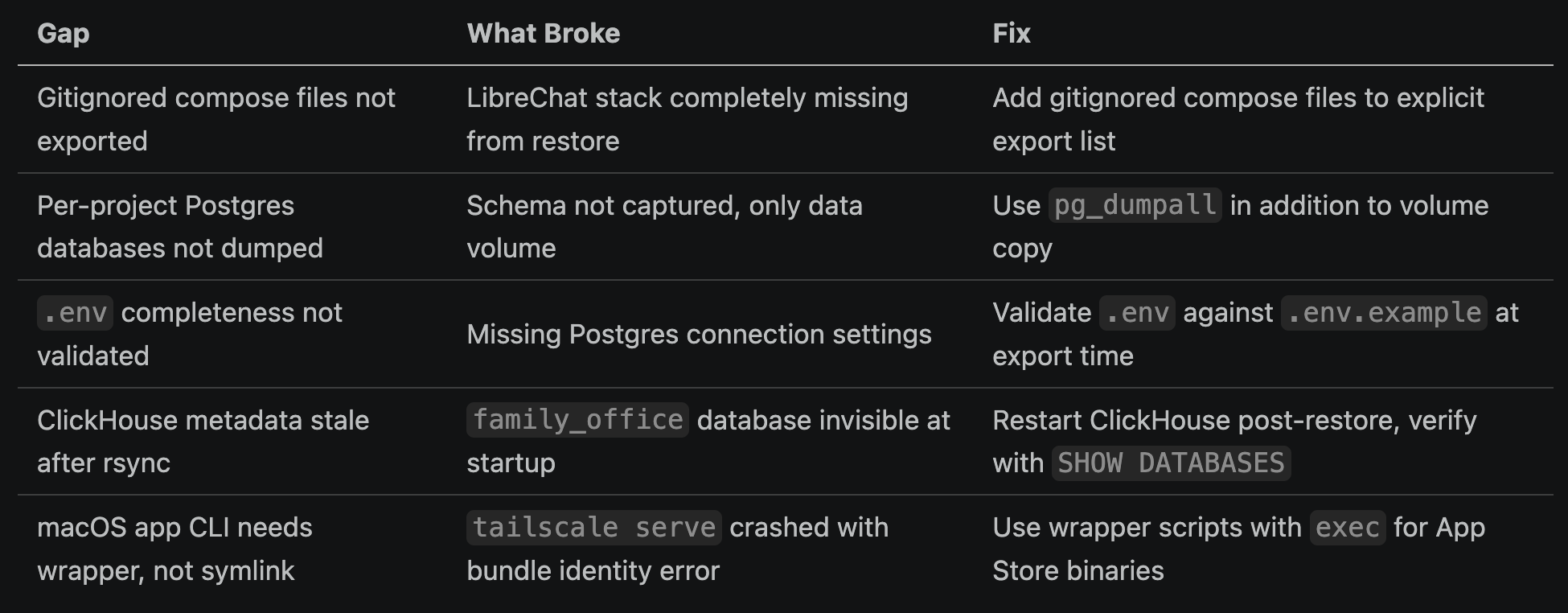
All five of these gaps were invisible until migration. None of them would have been caught by testing the system on the source machine, because on the source machine, all the implicit dependencies were already satisfied.
For the full eight-issue breakdown with exact diagnostic commands, the complete pre-migration checklist, and the step-by-step restore verification sequence, I wrote a companion reference guide: Docker Migration: MacBook to Mac Studio Reference Guide.
Migration as Forced Documentation
Here’s what I keep coming back to: every script I wrote for this migration was documentation that should have existed from the start. The migration didn’t create that documentation. It forced me to surface what was already true.
Writing export-for-migration.sh was the first time anyone (including me) documented exactly which .env files, data volumes, and cross-project dependencies existed in the system. That knowledge lived in one place: my head. I knew the ClickHouse data volume path because I set it up. I knew the Langfuse MinIO bucket because I configured it. I knew which .env files contained which secrets because I created them. None of that knowledge was written down anywhere that another person, or a future me, could follow.
Writing setup-mac-studio.sh was the first time the full system setup was scripted end-to-end. Before migration, setup was “follow the README, fill in the gaps from memory, ask me if something breaks.” That’s not a setup process. That’s a bus factor of one with extra steps.
The migration excavated the infrastructure. Each script was an act of archaeology, not discovery exactly, because I knew what was there, but formalization. Turning implicit knowledge into explicit, executable form. The setup script doesn’t just document what tools are installed; it documents the order they need to be installed in, the configuration flags that matter, the post-install steps that are easy to forget. The export script doesn’t just list what gets backed up; it encodes the judgment call about what matters enough to transfer.
If you can’t script your migration, you don’t understand your system. Not fully. The migration is the documentation.
This is a useful forcing function even if you never migrate. Writing a migration script for a system you have no plans to migrate forces you to answer the question: if I had to rebuild this from scratch, what would I need? The gaps in your answer are the gaps in your infrastructure literacy. Find them while the original machine is still running, not after.
The Improved Checklist
Five gaps found means five additions to the checklist. Here’s what changed:
Pre-export additions:
Validate every
.envagainst a corresponding.env.exampleor required-vars manifest before packaging. If a variable exists in the example but not in the.env, flag it. Don’t silently copy an incomplete file.Explicitly enumerate and export gitignored compose files. The export script now has a
GITIGNORED_COMPOSE_FILESarray that gets populated manually per system. Annoying but necessary.Run
pg_dumpallfor every Postgres instance, not just volume copy. Volume copies work until the Postgres major version changes or the volume has silent corruption.
Post-restore additions:
Scan for stale
.sql.tmpfiles in ClickHouse metadata directory before first start. One line of bash, saves two hours.Verify
tailscale servespecifically, not justtailscale status. The serve pathway touches entitlements that basic commands don’t.Run
.envcompleteness check on the destination machine, not just at export time. Settings can get added to the source after the export was packaged.
Verification additions:
SHOW DATABASESwith a row count spot check for every ClickHouse database, not just a container health green.Schema existence check for every Postgres database, not just connection test.
End-to-end service test for every stateful service: not “container is running” but “the thing I actually use this for works.”
The full verification sequence is in the technical post. But the principle is this: a passing healthcheck tells you the container started. It does not tell you your data is intact, your configuration is complete, or your integrations are functional. Those require separate verification.
48 Hours Later
The Mac Studio has been running for 48 hours. All services healthy. Backups completing. SSH from the iPad works. ClickHouse is handling queries. Langfuse is capturing traces.
The 3-layer sleep prevention stack is gone. No Amphetamine. No caffeinate. No pmset NVRAM settings. The Mac Studio doesn’t need them. A desktop on AC power doesn’t sleep. Four months of sleep-prevention infrastructure, decommissioned by a hardware swap.
The MacBook Pro is still running. Still serving as the backup machine while I monitor the Studio’s stability. It’s been idling on the desk for two days, handling nothing, its lid open, its fans quiet.
In Part 3, I’ll show the final step: decommissioning it. Removing 40+ LaunchAgents, 12 containers, 7 Tailscale proxies, and the full sleep prevention stack. Closing the lid for the first time in months. Watching the container dashboard go dark, service by service.
That’s the satisfying part. But the satisfying part is only possible because the migration worked. And the migration worked because the failures forced me to understand the system well enough to move it.
For the copy-paste version of every migration command, checklist, and validation script in this post, see the Migration Reference Guide.
This is Part 2 of a 3-part series:
The Migration That Documented Itself (this post)
Reclaiming Your Laptop (coming next)